SwiftGridView 1.1 is out, and it is almost entirely about one feature that had been marked experimental for as long as it has existed: pinch to zoom. It closes an issue open since 2018, where the reporter pointed out that the grid did not behave like Numbers, Sheets, or Excel and asked what a better version would look like. Unlike 1.0, this is not a breaking release.
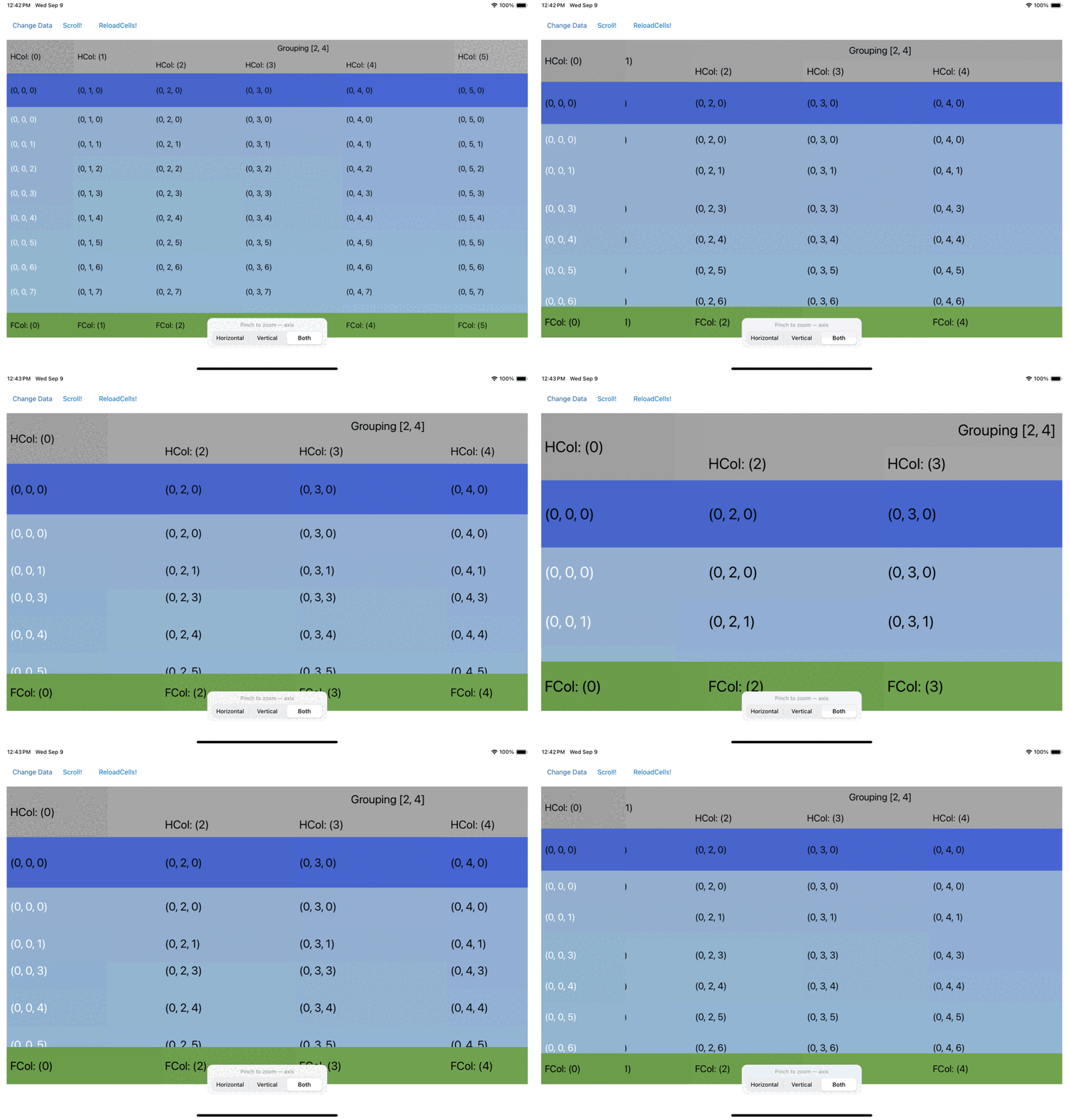
The old gesture was measuring the wrong thing
The original handler took UIPinchGestureRecognizer.scale and assigned it straight to the zoom. That value is not an absolute scale, it is the ratio since the current gesture began, and it resets to 1.0 every time you put two fingers down. Zooming to 2x, lifting your fingers, and pinching again snapped the grid back toward 1.0 before it moved anywhere. Every pinch started over.
Two smaller things were wrong in the same handler. Scales outside a hard-coded 0.35...5 were discarded rather than clamped, so pinching past the limit read as the grid refusing to respond rather than as reaching the end. And the gesture’s state was ignored, so the handler would act on a recognizer that had already ended.
The zoom is now derived from the gesture rather than accumulated across it: the scale when the pinch begins is recorded, and each update applies the recognizer’s ratio against that.
Zooming the whole grid, but not the whole cell
The substance of the original issue was that zoom only scaled column widths. Rows kept their height, so the grid stretched sideways instead of getting bigger. Every size the layout consumes now runs through a single zoom-aware accessor, so content size, cached offsets, and individual attributes cannot disagree about how big things are, and zoomAxis decides what participates:
grid.pinchExpandEnabled = true
grid.zoomAxis = .both          // .horizontal, .vertical, or .both
grid.minimumZoomScale = 0.75
grid.maximumZoomScale = 2.0
The default is .horizontal, which is what 1.0 did, so nobody’s grid changes shape on upgrade.
The grid does not scale the contents of your cells. It has no idea whether a cell holds an 11pt label, an image, or a chart. A new delegate callback hands you the scale instead:
func dataGridView(_ dataGridView: SwiftGridView, didChangeZoomScale zoomScale: CGFloat) {
    for case let cell as MyCell in dataGridView.visibleCells {
        cell.label.font = .systemFont(ofSize: 17 * zoomScale)
    }
}
Both examples do this. The SwiftUI one hosts SwiftUI views inside its cells, so scaling there means pushing a value into the hosted root view rather than setting a UIFont.
Damping a ratio is not a subtraction
zoomSpeed makes the zoom less sensitive than the gesture. My first version damped the distance from 1:
let damped = ((recognizer.scale - 1.0) * zoomSpeed) + 1.0That is lopsided, which I did not notice until review. Pinching out, scale grows without bound and so does the damped value. Pinching in, scale approaches 0, so the damped value bottoms out at 1 - zoomSpeed. At a speed of 0.5, one gesture can never take you below half of where you started. The example ships a 0.75 minimum and a 2.0 maximum, so from full zoom the bottom of its own range was unreachable in a single pinch.
Scale is a ratio, so the damping belongs in the exponent:
let damped = pow(recognizer.scale, zoomSpeed)Pinching by k and by 1/k now give reciprocal results, both ends of the range stay reachable, and a speed of 1.0 still tracks the gesture exactly.
The bug that only a real device found
With all of that in place and a green test suite, the zoom still felt broken on device. It worked, then stopped, then worked again. The console showed gesture after gesture ending on the same scale, wedged first at 1.0 and later at 0.75.
The cause was one line in the wrong place. The handler rebased the recognizer, by assigning to scale, before the check that could reject the resulting step. When snapping rounded a step back onto the stop you were already on, the step was rejected but the finger movement behind it had already been discarded. A slow pinch is dozens of small updates, every one thrown away, so it could never accumulate the 25% needed to reach the next stop. A fast pinch lands one large update and occasionally clears the gap outright.
The tests could not have caught it. My stub recognizer returned a fixed number for scale, so the rebasing had nothing to act on. Once the stub modeled what UIKit actually does, including moving the reference point when you assign to scale, the regression test reproduced the exact stuck values from the device log. A test double has to behave like the framework, not like the implementation happens to read it.
Device testing turned up a smaller one: a pinch is easy to land a stray third finger in, and that finger selected whatever it came down on. Selection is now suppressed while a pinch is in flight, behind allowsSelectionDuringZoom if you want the old behavior.
SwiftUI state can finally reach the grid
SwiftGrid gained a second closure. Before this, configure ran once when the view was created and nothing else could reach the underlying grid, so SwiftUI state could not drive a property. Wanting a picker for the zoom axis made that obvious:
SwiftGrid(dataSource: model, delegate: model) { gridView in
    gridView.register(DemoCell.self, forCellWithReuseIdentifier: DemoCell.reuseIdentifier())
} update: { gridView in
    gridView.pinchExpandEnabled = true
    gridView.zoomAxis = model.zoomAxis
}
update runs on every SwiftUI update, so it is for assigning properties, not performing actions: reloading or changing the selection there would repeat on every pass. configure still runs once, and a lone trailing closure still binds to it, so existing call sites keep working.
Tests
Library coverage went from 63% to 97%, mostly by covering the selection surface, which had no tests at all. Two rounds of review then found six defects and three more after that. Every fix landed with a regression test I verified by reverting the fix and watching it fail with the reported symptom, because a regression test that cannot detect the regression is worth nothing.
The 1.1.0 release is on GitHub, with the full changelog and both example apps.